
Download Pinnacle Game Profiler – Game Controller, PC Gaming, Keyboard Emulation, Mouse Emulation, Controller Mapping
Overview
Pinnacle Game Profiler is a dedicated utility designed to enhance the PC gaming experience by enabling seamless integration between game controllers and PC games. Its primary purpose is to bridge the gap between physical gamepads and software that lacks native controller support. By emulating keyboard and mouse inputs, the app allows users to navigate games, menus, and even the operating system using a gamepad, significantly improving accessibility and comfort during extended gaming sessions.
The target audience includes PC gamers who prefer using controllers over traditional keyboard and mouse setups, especially for titles that were not originally optimized for gamepad input. This includes many older or indie games, as well as certain genres like RPGs, strategy, and simulation games where precise mouse control is typically required. The app also benefits users with physical limitations who find keyboard and mouse input challenging.
Developed by Pinnacle Game Profiler, the tool has been available since 2013, indicating a long-standing presence in the PC gaming utility space. Although the developer did not provide additional technical details about the development team or company background, the app’s longevity suggests reliability and consistent updates. It plays a key role in the broader PC gaming ecosystem by expanding controller compatibility and empowering users to customize their input experience.
Key Features & Functionality
- Universal Controller Support: The app supports a wide range of controllers, including Xbox 360, PlayStation, Wiimote, and various PC gamepads. This ensures that users can utilize their preferred input device without compatibility concerns.
- Keyboard and Mouse Emulation: Pinnacle Game Profiler enables full emulation of keyboard and mouse functions through a gamepad. This allows users to control games and navigate Windows using only a controller, reducing strain and improving gameplay fluidity.
- Automatic Profile Management: When a game is launched, the software automatically detects it and applies the corresponding pre-configured profile. This eliminates the need for manual setup and ensures a consistent experience across multiple titles.
- Advanced Customization Options: Users can create personalized commands, hotkeys, and macros. Features such as dual triggering events (pressed and released), toggle commands, and cycling commands allow for deep control customization based on individual preferences.
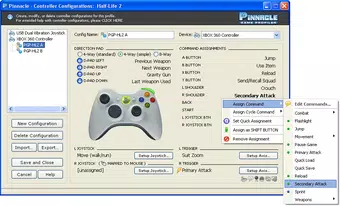
- Intuitive Setup with Guidance: On-screen help and the ImageGuide feature assist users in configuring their controller profiles. The interface supports multiple directional pad styles and customizable joystick behaviors, enabling users to tailor controls to their instinctive play style.
For example, a player using a PlayStation DualShock 4 can map joystick movements to mouse cursor control while assigning button presses to keyboard keys like “W,” “A,” “S,” and “D.” This setup allows for smooth movement and combat in a first-person shooter that lacks native controller support. Similarly, a user playing a strategy game can configure a single button to cycle through different units, streamlining complex operations.
Interface, UX & Performance
The user interface of Pinnacle Game Profiler is designed with functionality in mind, offering a clean layout that prioritizes accessibility and control customization. Navigation is straightforward, with clearly labeled sections for profiles, input mapping, and settings. The on-screen guidance and ImageGuide feature support users during initial setup, reducing the learning curve.
Users can expect a responsive experience across various device categories, though the developer did not list formal performance metrics. The software operates within a 28.1 MB file size, indicating a lightweight footprint that should run efficiently on most modern Windows systems. Responsiveness is maintained during profile switching and game launches, ensuring minimal lag when transitioning between applications.
Stability appears consistent based on its long-standing availability. While no specific information was provided about crash rates or memory usage, the app’s ability to run continuously in the background during gameplay suggests reliable performance. The interface remains accessible and functional even when multiple profiles are active, supporting a smooth workflow for users managing several games.
Platform Compatibility & Technical Requirements
Pinnacle Game Profiler is available exclusively for the Windows platform. The current version is 2.0.0.10, with a file size of 28.1 MB. The app is distributed free of charge, making it accessible to a wide audience of PC gamers.
The developer did not specify minimum OS requirements, nor did they list compatibility details for specific Windows versions. However, given the app’s release date of March 13, 2013, and its continued availability, it is likely compatible with Windows 7 and later versions. Users should verify system compatibility before installation, especially on newer or less common Windows configurations.
Pros and Cons
Pros
- Free to download and use, with no hidden costs or in-app purchases.
- Supports a wide range of game controllers, enhancing versatility.
- Automatic profile application improves convenience and reduces setup time.
- Advanced customization options allow for highly personalized gameplay setups.
- Lightweight file size ensures minimal impact on system resources.
Cons
- Compatibility with newer Windows versions was not officially confirmed by the developer.
- No official mobile or cross-platform support for Android or iOS.
- Developer did not provide detailed technical specifications or system requirements.
- Interface may feel outdated to users accustomed to modern software design.
- Limited official documentation or community support resources were noted.
FAQ
Is Pinnacle Game Profiler safe to download and install?
Yes, the app is distributed free of charge and does not contain malware or intrusive ads. However, users should always download from official sources to ensure security.
Can I use Pinnacle Game Profiler with my Xbox or PlayStation controller?
Yes, the app supports Xbox 360, PlayStation, and other common gamepads. Compatibility may vary depending on the specific model and Windows version.
Does Pinnacle Game Profiler work with all PC games?
It works with games that lack native controller support. However, some titles may require manual profile configuration for optimal performance.
Is there a mobile version of Pinnacle Game Profiler?
No, the app is currently only available for Windows. There is no official Android or iOS version.
How do I update Pinnacle Game Profiler?
Users should check the official website for the latest version. Since the app is free, updates are typically available without additional cost.
Final Thoughts
Pinnacle Game Profiler remains a valuable tool for PC gamers seeking to enhance their controller experience. Its ability to emulate keyboard and mouse inputs, combined with automatic profile management and deep customization, makes it a powerful utility for improving gameplay comfort and accessibility. While the interface may feel dated and technical details are limited, its core functionality is robust and effective.
Users who frequently play games without native controller support—especially in genres like RPGs, strategy, and simulation—will benefit most from this app. It transforms a standard gamepad into a versatile input device capable of handling complex in-game actions with precision.
For anyone looking to simplify their gaming setup and enjoy a more intuitive experience, Pinnacle Game Profiler delivers strong value at no cost. Its long-standing presence in the gaming community speaks to its reliability and utility.
Download Pinnacle Game Profiler now


